 SafeGrounds
SafeGrounds User Guide
Case Audit
A chronological record of all activity and changes made to a case in SafeGrounds
Understanding the Audit Log
The Case Audit page provides a chronological record of activity on a case. This page is available to any user who has view permission on the case. The audit log increases transparency by showing when changes occurred, what was changed, and who made the change.
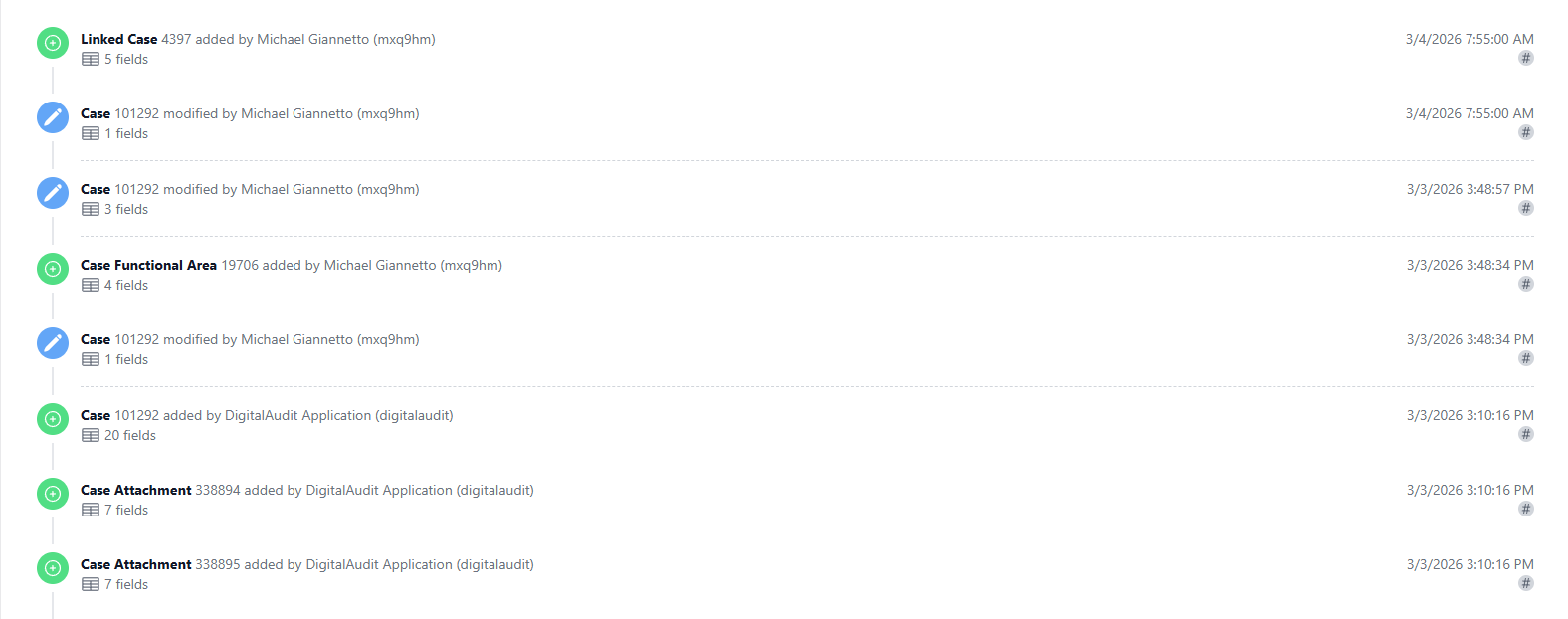
What the Case Audit Displays
Each audit entry includes:
- Date and time of the event
- Type of event (e.g., Case Action, Case Attachment, Case Incident Type, Case Involved Party, etc.)
- Whether the item was added or modified
- The user who made the change
- What field or data was affected
This allows users to track the full history of case activity.
Types of Events Tracked
Examples of tracked events include:
- Case Actions added or edited
- Attachments uploaded or modified
- Incident Types updated
- Involved Parties added or edited
- Case data updates
- Other structural case changes
Filtering the Audit Log
The Case Audit page includes filtering options that allow users to refine the audit results.

Users can filter by:
- Event type
- Added or modified status
- User
- Date range
- Affected field or data type
Filters help users quickly locate specific changes within the case history.
When to Use Case Audit
The Case Audit page is commonly used to:
- Review case history
- Confirm when updates were made
- Identify who made a specific change
- Investigate data discrepancies
- Support internal reviews or compliance inquiries